

Every day we receive a dozen emails with different questions, requests, and wishes. Thank you for being actively involved in our project! We decided to collect all frequently asked questions in one place. Let’s go!
Can I try the app before purchase?
What Odoo versions are supported?
Do you have hardware requirements?
How do I buy Ventor licenses?
What is the difference between Ventor and Odoo Barcode?
What is the difference between the PRO version from the site and Google Play version?
Where can I find Ventor guides?
How can I upgrade my license to use it on more devices?
How can I manage the licensing and activation? Do I activate it per device?
How can I switch my Ventor license to my new device?
Do you offer a white-label version?
Does Ventor work offline?
I need a new feature. Is it possible to develop it?
Can I hide some menus from users?
What languages does the app support?
When is the IOS version expected?
How to configure the pick locations?
Where do I find the Privacy Policy model?
My Android device has no Google Play services. How can I run Ventor?
Can I print product labels with Ventor on a zebra?
I get a server error in Ventor “Invalid field ‘XXX’ on model ‘YYY’”
How to rate Ventor on Google Play
How can I cancel my subscription?
Where should I buy the Ventor PRO app: on the official website or as part of the Ecosystem?
Can I try the app before purchase?
Yes, you can. Click here to download
And watch this video describing full process
What Odoo versions are supported?
The Ventor PRO application is compatible with all Odoo versions (Community and Enterprise) from Odoo v8 to Odoo 18+, as well as all Odoo hosting options: Odoo Online, Odoo.sh (Software Hosting), and Odoo On-Premises.
All customers receive updates with new features, though many of the latest features are only compatible with the last 3-4 Odoo versions. Additionally, all customers have access to our portal, where they can report issues or submit feature requests.
We offer limited free support for older Odoo versions (v8-v12) to ensure the app remains operational, but new features and functionality are not added. Paid support is available for all versions.
Do you have hardware requirements?
Ventor app works on any Android Handheld scanner or another device with Android 5.1 and higher. Technical requirements are next:
- 2Gb of RAM (better to have 4Gb)
- Android 5.1+ (better to have 8.0+)
- 4-inch screen (better 5″+)
As an official Zebra partner, we recommend using the newest devices provided by Zebra Technologies: TC21/TC26, MC3300, etc. However, you are not limited by one supplier. Check out Newland, Honeywell, CipherLab, ScanSKU, etc.
Windows OS is not supported!
How do I buy Ventor licenses?
You need to add any amount of licenses into the shopping cart. You can buy licenses using Stripe (paying with a card) or bank transfer (in case of bulk purchase). Follow this video to buy Ventor or get free trial.
What is the difference between Ventor and Odoo Barcode?
A few years ago we created a comprehensive comparison – https://ventor.tech/mobile/ventor-vs-odoo-barcode/
It has a table and summary at the end.
Since then Ventor has been redesigned and we have added a lot of new features.
Here is a short summary of advantages of Ventor over Odoo Enterprise Barcode:
1. Advanced inventory features
Ventor PRO offers a wide range of advanced inventory features that are not available in the Odoo Barcode app.
This includes more settings, access rights, and features related to inventory management: RFID management, scrap, package and putaway management, order recheck, and many more.
2. Native mobile app
Ventor PRO is a native mobile app that is designed specifically for inventory management in Odoo.
This means that it is optimized for use on mobile devices and provides a seamless experience for your warehouse staff.
3. Improved efficiency
With Ventor PRO, you can more efficiently guide and route your pickers and warehouse staff, saving time and reducing errors.
This can lead to increased productivity and improved customer satisfaction.
4. Better UI/UX
The UI and UX of Ventor PRO are designed based on the best-in-class inventory apps, providing a modern and intuitive interface that is easy to use.
5. Customization and Migration
Ventor PRO can be easily customized and then migrated to the newest Odoo versions.
On the other hand, the Odoo Barcode interface is not customizable at all, and any customizations made are not portable.
6. Fully integrated ecosystem
Ventor PRO is fully integrated into the VentorTech ecosystem, which includes direct printing, scaling, and other features that can enhance your inventory management capabilities.
7. Regular releases and improvements
Ventor PRO gets updates with new features, settings, and fixes every month, and customers can request features and impact the product roadmap.
8. Dedicated support
Ventor PRO comes with a dedicated support team that can help and consult your business.
This ensures that you have the support you need to effectively manage your inventory and streamline your warehouse operations.
What is the difference between the PRO version from the site and Google Play version?
There are no functional differences. However, you can’t customize Google play version at all. Additionally you will not get access to license management to activate or deactivate devices remotely for your employees.
So, if you don’t need customizations and you work in small familly business then you can go with the Google play version.
If you want to add some features in the future or if you have employees, you need to buy the PRO version from our website here
Where can I find Ventor guides?
– Please check our full FAQ – https://ventor.app/blog/ventor-app-faq/
– Our quick start guide – https://ventor.app/guides/ventor-quick-start-guide/
– Look through videos in our YouTube channel – https://www.youtube.com/c/VentorTech
– And articles in our blogs – https://ventor.tech/blog/ https://ventor.app/news/
If you haven’t found an answer, you can contact us. There are a few ways to get support:
– Use the “Leave feedback” menu inside the app (preferred as we get some technical info from the app)
– Send an email to us at support@ventor.tech or hi@ventor.app
– Fill in a contact form on this website
Principles of the support:
– Customers get support and feature requests in first
– Cosmetics fixes are planned for one time per month
– Bottlenecks and big issues with the app are resolved within 24 hours
– If you have troubles with the app, please record a video to show the issue. Issues with a video get support priority and usually get resolved faster
If something doesn’t work with the app (e.g., you can’t validate a transfer or get error messages while trying to make internal transfers), please make sure that you have no the same issues on the Odoo side first. In most cases, such issues are related to Odoo and not to the Ventor app.
How can I upgrade my license to use it on more devices?
If you already have a license, you can just extend it (buy more activations for the same license key). Follow this instruction:
- Go to your account – https://ventor.app/your-account/
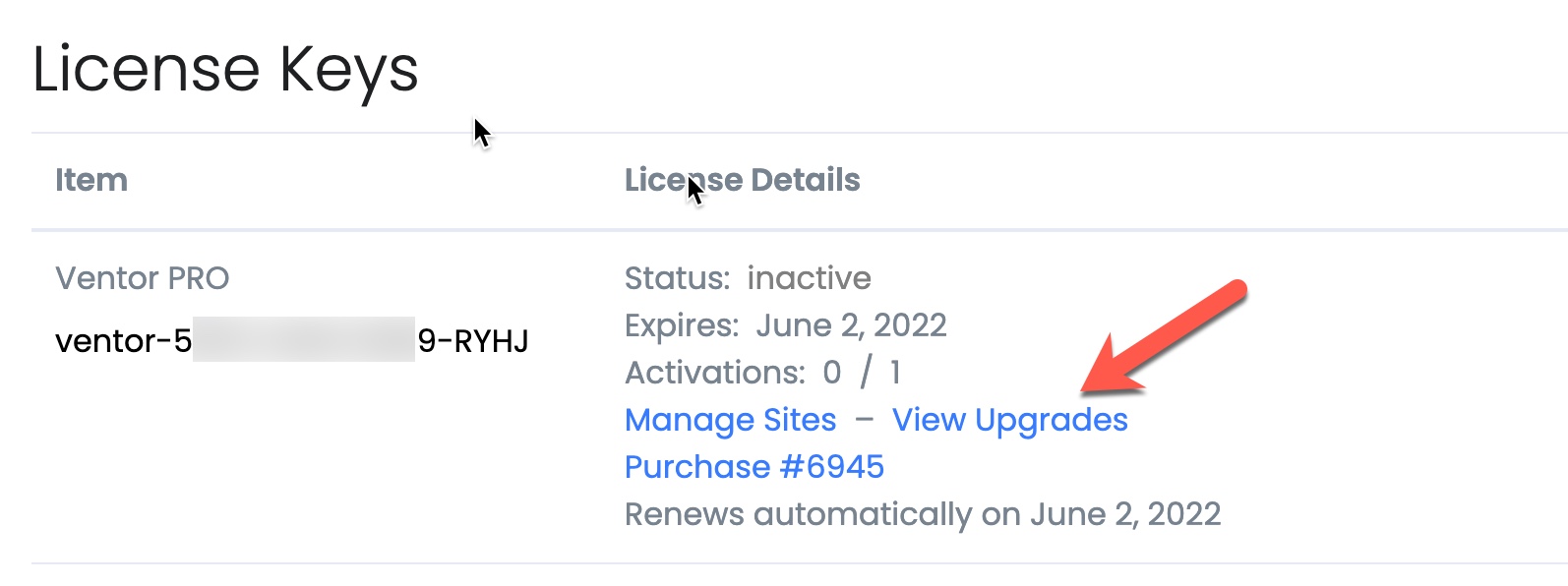
- Find your license and click “View Upgrades”
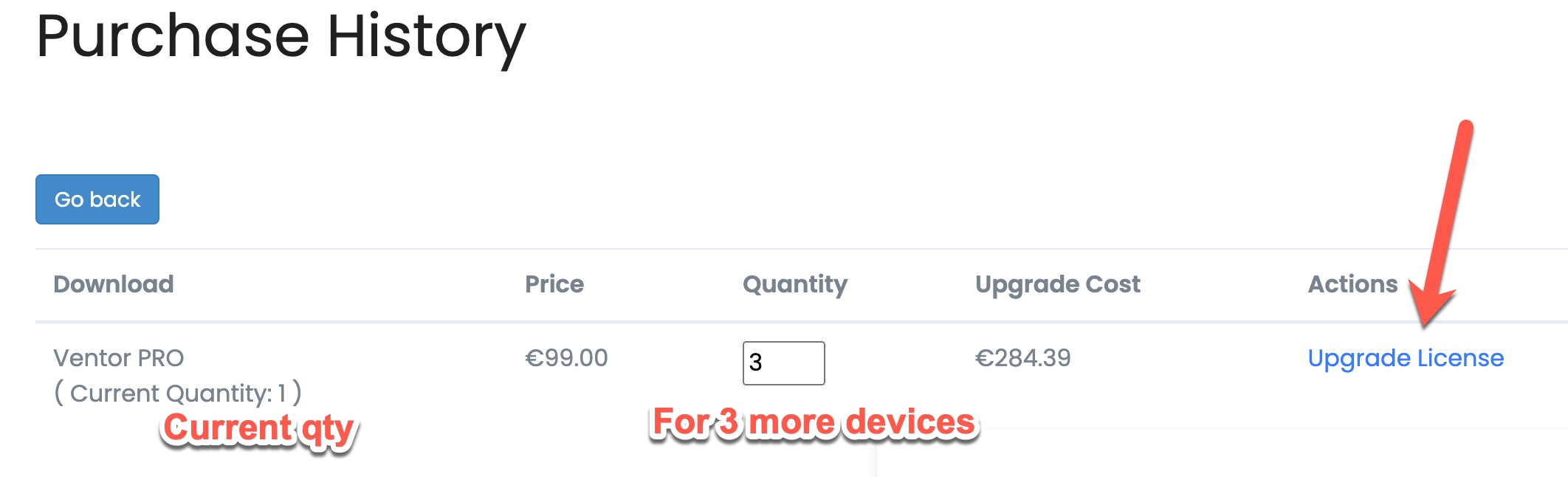
- Insert needed amount of activations (in addition to existing) and click “Upgrade License”
- Go through checkout process
How can I manage the licensing and activation? Do I activate it per device?
Yes, you can do it. You can buy X licenses and then activate them per device using a license code. For example, you buy 10 licenses. We send you the license’s code: 123-456-789. You may activate it for any 10 android devices. You can manage all activated devices in your personal account.
How can I switch my Ventor license to my new device?
- Log in to your account on ventor.app
- Find related license
- Click “Manage Devices”
- Choose your device from the list and click deactivate. You can find device ID in the “About” menu inside the Ventor app
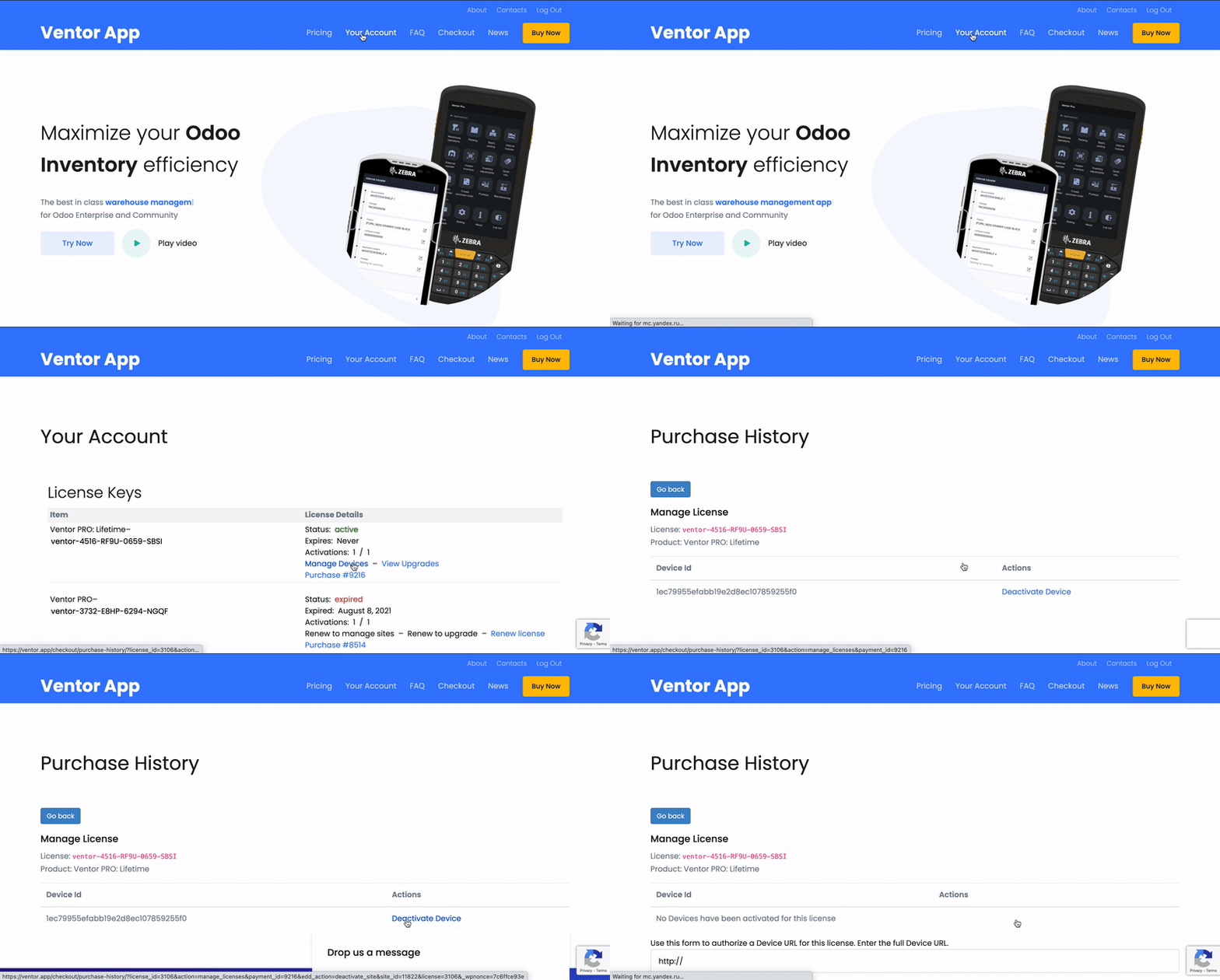
Or directly from the app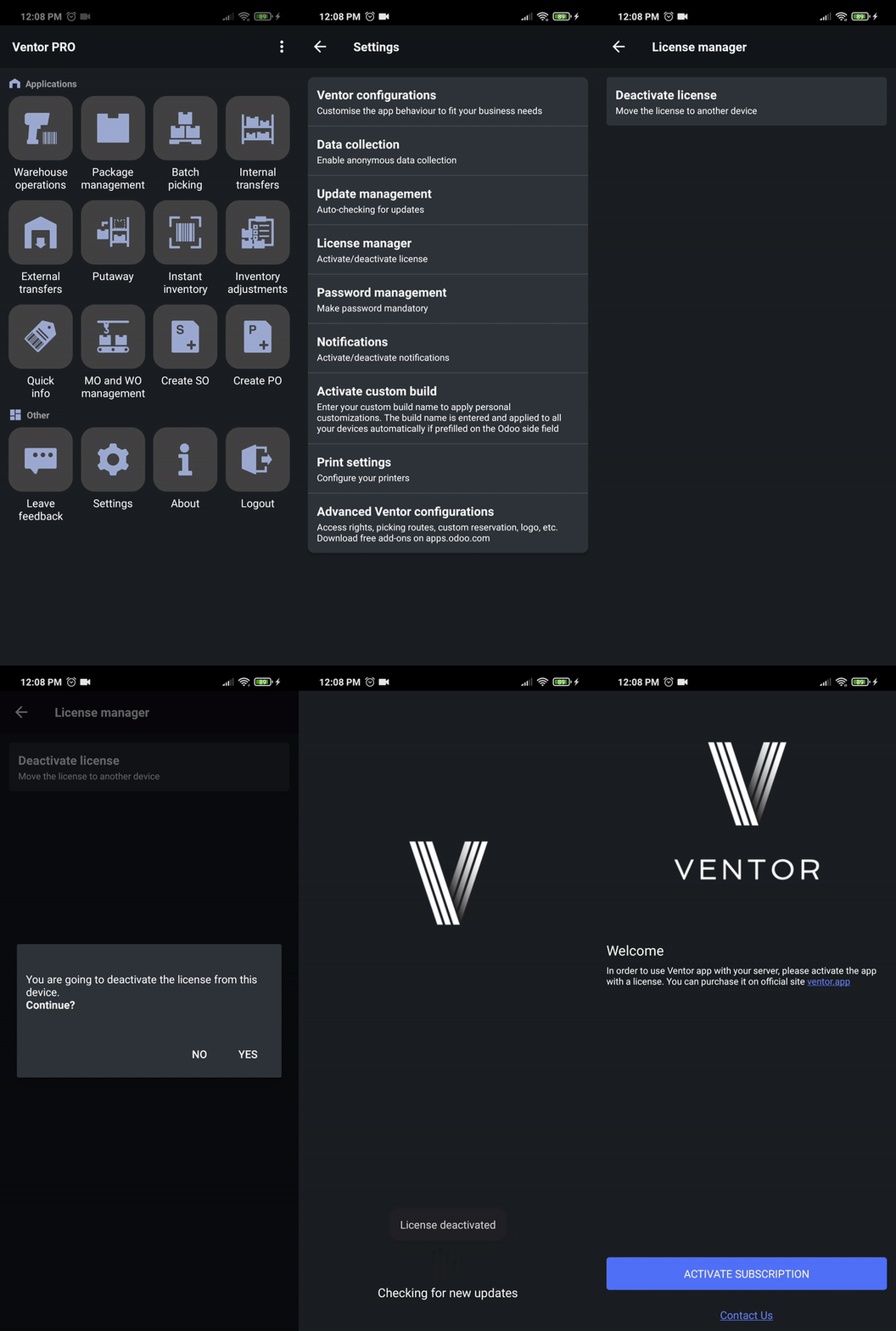
After that, you can use the license on another device.
Do you offer a white-label version?
In most cases, partners are asking for changing the logo. It’s free and you can do it with our free Odoo app. So you can have a custom look and feel of the application. But we don’t provide the source code to be resold as a completely other product.
Does Ventor work offline?
Unfortunately, the app doesn’t have an offline mode. We thought about the implementation but haven’t received enough requests. We can consider custom development, e.g., a particular business workflow.
I need a new feature. Is it possible to develop it?
Custom development service is available for any user. Drop us an email with a business description. We will estimate the effort and you can give a green light after the payment.
Can I hide some menus from users?
Yes, you can fully manage access rights per user and show only needed menus (e.g. Warehouse operations and Inventory Adjustments only). For this, you need to install our free Odoo app ventor base and make a configuration per user on the Odoo side.
You can also manage access rights globally for all users.
Install this module https://apps.odoo.com/apps/modules/18.0/ventor_base
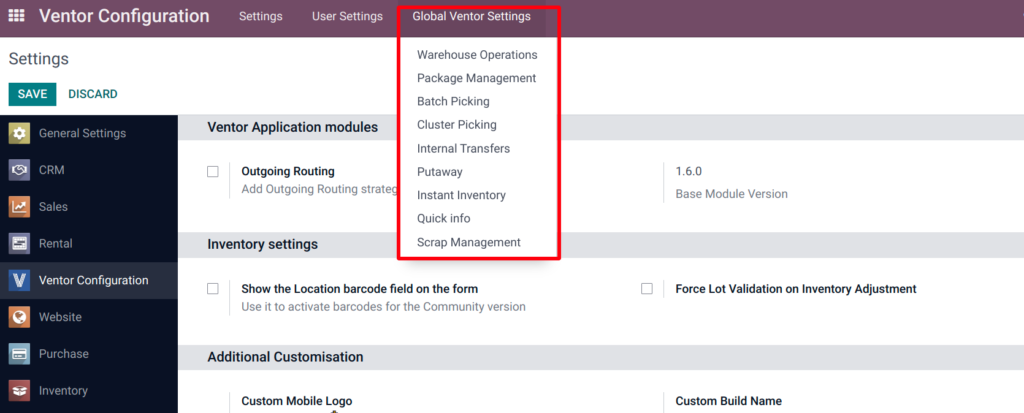
In this menu, Global Ventor Settings, you can set global settings for the application
Further, in the user settings, it is possible to set up individually which settings to use for each user – global from Odoo or from the application
The following user settings allow you to restrict access to global and local settings
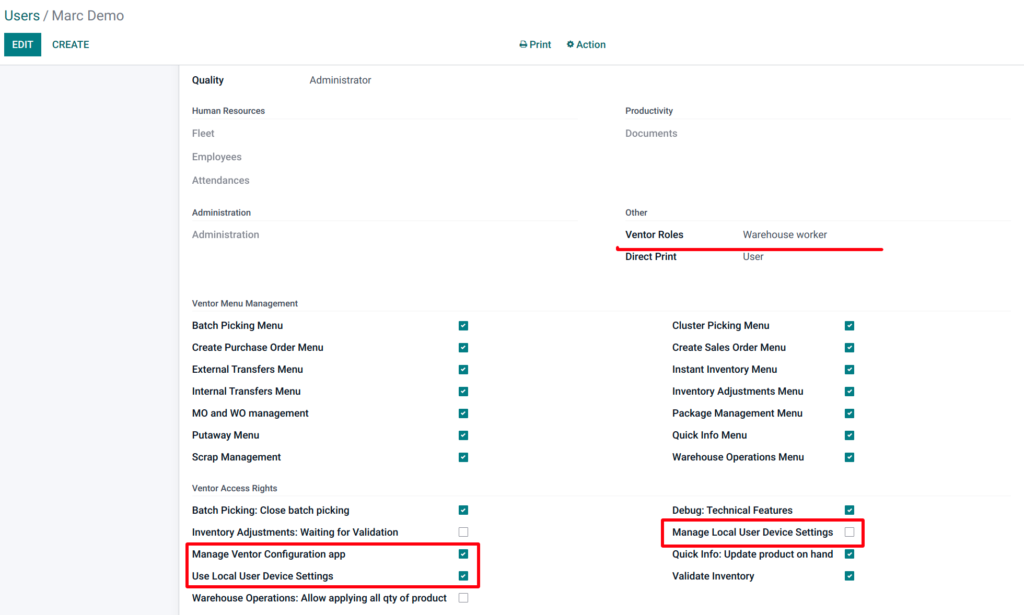
Manage Local User Device Settings – Enable to allow to define local Ventor settings from Ventor application interface
Use Local User Device Settings – If it’s checked, the manual settings (defined on device by this user) will be used instead Global Ventor Settings in Odoo. If it’s unchecked the user will not be able to modify settings on the device manually. Global Ventor Settings will be used instead
Manage Ventor Configuration app – Enable to see new root menu “Ventor Configuration” that will allow to define global Ventor settings from the Odoo interface
By disabling the Manage Local User Device Settings setting, the user will not be able to change the settings on Ventor. Disabling this setting is available for the Ventor Role = Warehouse worker group
What languages does the app support?
Currently Ventor was translated to 20 languages including English, French, German, Japanese, Norwegian, Spanish, Ukrainian, Arabic and others. If your language is missing, drop us an email and we will add you to our translation platform.
When is the IOS version expected?
Ventor app has no iOS version and we won’t do this. The app was developed to work with mobile computers (connect barcode scanners and handheld terminals to Odoo Inventory), not phones. If you need to use it on your phone, it should be an Android phone (connects your mobile camera as a barcode scanner to Odoo).
How to configure the pick locations?
In order to pick products by zones, you need to configure Warehouse routes in Odoo that will combine all lines from one warehouse zone into one picking. Watch the video – https://youtu.be/yS9-FoBsbUE (1:40 – 7:30). Then you can open these transfers in the Ventor app and process the pickings in a particular zone. You can also assign pickers to related transfers.
Where do I find the Privacy Policy model?
You can find the document here Privacy Policy
My Android device has no Google Play services. How can I run Ventor?
Please follow this instruction Ventor complete guide. Introduction | Ventor app
Can I print product labels with Ventor on a zebra?
Sure, you can directly print product labels and other Odoo reports like Delivery slips, Shipping labels, Lot labels, etc. You need to install the Odoo direct print app on your Odoo and then you will be able to print instantly from barcode scanner (without downloading files).
This is how it works:
I get a server error in Ventor “Invalid field ‘XXX’ on model ‘YYY’
If you catch a similar error, it’s usually related to migration issues. In most cases, the field ‘XXX’ should not exist in your new Odoo version. Please check with your Odoo integrator.
If you have Odoo v15 and higher, please try to login to Ventor under an admin user first time.
Optionally, you can provide us with access to your test DB and we will help you.
How to rate Ventor on Google Play
Every week we get warm words from our customers by email or in support tickets. For us and our new potential customers it’s great if you could share your experience on Google Play.
Here is a short instruction:
- Go to our page on Google Play
- Rate us by clicking on stars
- Describe your experience and publish your review
* You must be logged in under the account you’ve downloaded the app
** If you use Ventor PRO and have never downloaded Ventor from Google Play, you need to download it to leave a review (it’s free)
How can I cancel my subscription?
You can cancel the subscription at any time in your personal account as well as you can reactivate canceled subscription.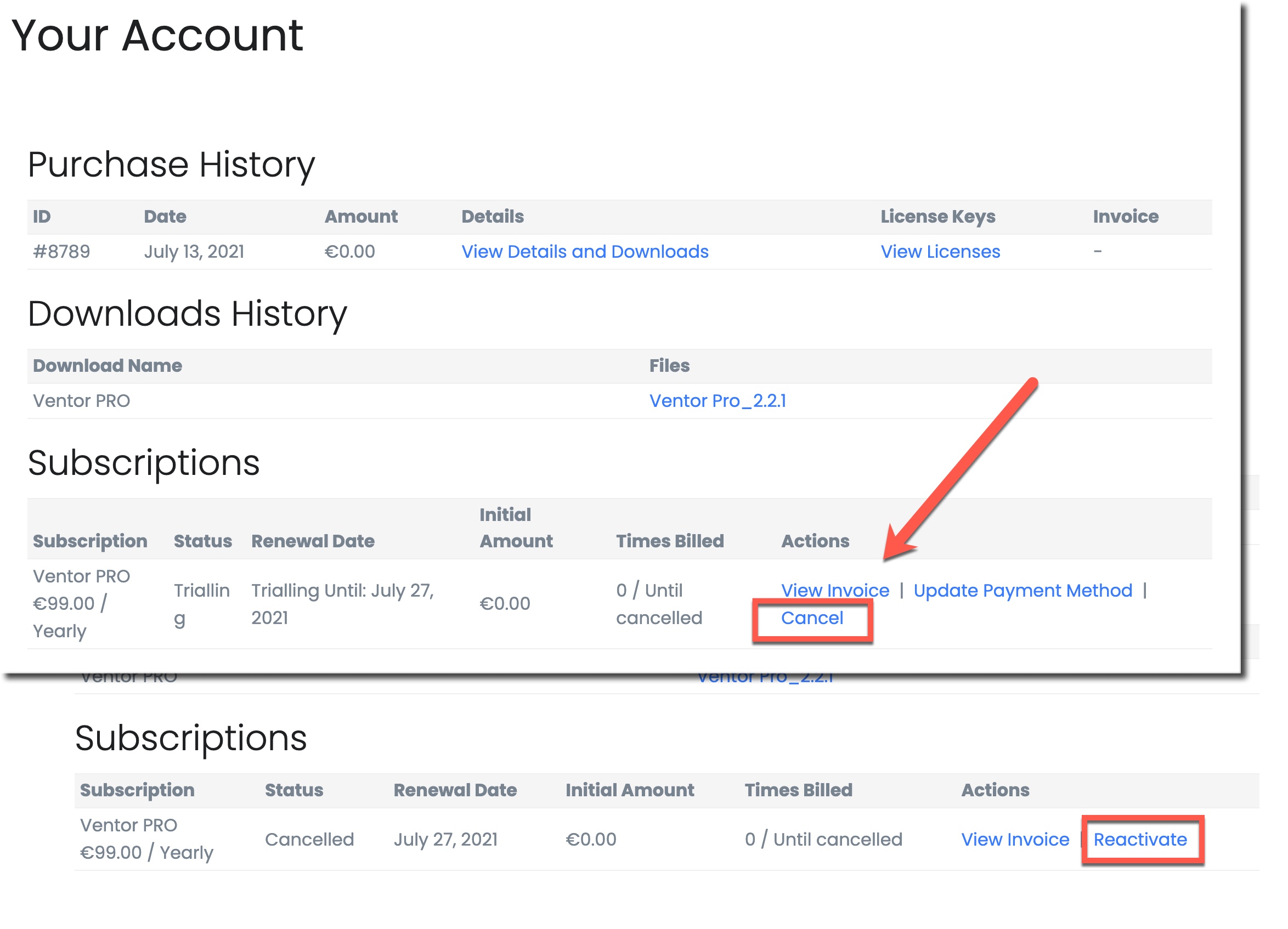
Where should I buy the Ventor PRO app: on the official website or as part of the Ecosystem?
Ventor PRO on ventor.app:
- Ideal for standalone purchases, independent of other subscriptions.
- Licenses are available in any quantity, including single purchases.
- Individual license pricing is higher on this site.
Ventor PRO on ecosystem.ventor.tech:
- Available as a discounted add-on for Ecosystem subscribers (for example, customers who purchased our connectors or Direct Print from ecosystem.ventor.tech).
- Sold in packs of 5, 10, or 50 licenses.
- Need a specific number like 15 licenses? Simply add the 5-license pack to your cart three times.